
How to Register for JAMB Step-by-Step 2026/2027:- Many students see JAMB registration as something stressful, especially when doing it for the first time. It doesn’t have to be. Once you understand the steps, the whole process becomes easier. This guide explains everything clearly what you need, how to get your profile code, how to buy the e-PIN, and how to complete the registration at a CBT centre.
If you’re planning to sit for UTME or Direct Entry in 2026/2027, take your time and read through.
What You Must Have Before you Can Register for JAMB 2026
The registration process goes smoothly when you already have these:
- A valid NIN
- A working phone number
- Your profile code
- A personal email address (Gmail recommended)
- O’level results or Awaiting Result
- Recent passport photograph
- Money for registration and e-PIN purchase
- Basic personal details: name, date of birth, home address, LGA etc.
If you don’t have a NIN yet, start there first. It’s compulsory.
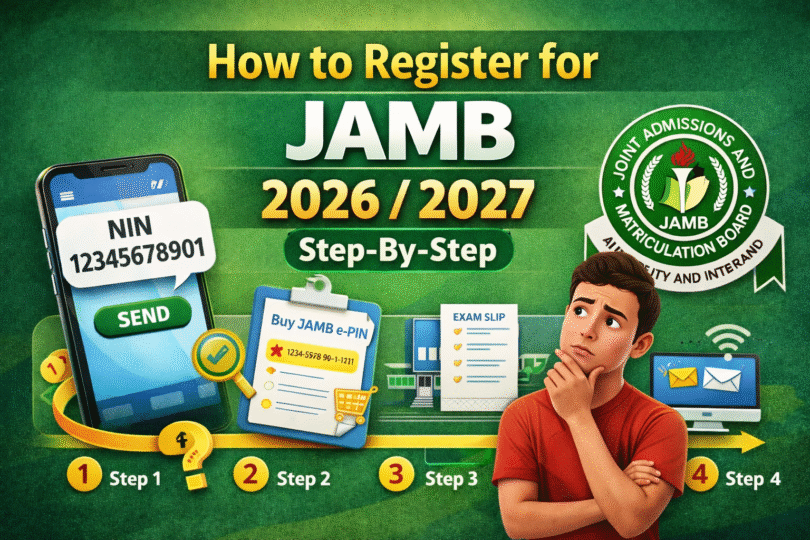
How to Register for JAMB Step-by-Step 2026/2027
To register for JAMB 2026 follow the steps below;
Step 1: Generate Your JAMB Profile Code This is your identity throughout your JAMB journey.
Using SMS
- Open the SMS app on your phone
- Type this:
NIN 12345678901 - Send it to 55019 or 66019
Make sure you have airtime. You’ll receive a 10-digit code shortly. If SMS doesn’t work, visit the JAMB portal and create a profile with your NIN to retrieve the code.
Step 2: Buy Your JAMB e-PIN After getting your profile code, you need the e-PIN for full registration. You can buy it through:
- Banks (UBA, Zenith, First Bank, Access, Polaris etc.)
- Remita or Flutterwave
- Mobile money agents & POS outlets
- JAMB offices & CBT centres
Once payment is successful, the e-PIN will be sent to your phone.
Step 3: Register at an Accredited CBT Centre This is where real registration takes place. Walk in with your:
- Profile code
- e-PIN
- Phone number and email
- O’level result (or awaiting)
- Personal details
At the centre, they will capture your fingerprints, passport photo, and help you complete your form. Make sure your subject combination matches your course. Do not rush through the details—cross-check before submission.
After everything, ask them to print your registration slip.
Step 4: Reprint Your Exam Slip Later When JAMB releases exam schedules, you’ll reprint your slip to see:
- Date of exam
- Time
- Centre location
Keep this slip safe because you won’t be allowed into the exam hall without it.
Who Is Eligible to Register for JAMB 2026?
You can apply for JAMB 2026/2027 if:
- You have completed or are completing secondary school (SSCE/WAEC/NECO/NABTEB)
- You have a valid NIN linked to your details
- You plan to apply for UTME or Direct Entry
- You wish to gain admission into Universities, Polytechnics or Colleges of Education
There is no fixed age limit, although most candidates are within secondary school/tertiary education age.
Documents You Should Have Before Starting Registration
To avoid delays, prepare these ahead of time:
- NIN (National Identification Number) – compulsory
- Personal phone number
- Email address (preferably Gmail)
- O’level results or Awaiting Result if not yet released
- Recent passport photo
- Money for e-PIN purchase and registration fee
- Personal details such as address, LGA, date of birth
Having everything ready makes registration smooth.
Also Read: How to Get JAMB Profile Code for 2026/2027 Registration
How to Choose Correct JAMB Subject Combination
Your subjects depend on your intended course. Examples:
- Medicine: English, Biology, Chemistry, Physics
- Law: English, Literature, Government, CRS/IRS
- Engineering: English, Mathematics, Physics, Chemistry
- Accounting: English, Mathematics, Economics, Government
Wrong combination can cost you admission, so confirm before registering.
How to Choose the Right School During JAMB Registration
To choose school you must Consider the followings:
- JAMB cut-off marks
- Admission competition
- Tuition affordability
- Distance and environment
- Course accreditation
Common Mistakes to Avoid During JAMB Registration
- Using someone else’s NIN
- Registering at unapproved cyber cafés
- Losing your profile code or e-PIN
- Incorrect course subject combination
- Ignoring CAPS and result upload later
A single mistake can delay your admission.
After Registration What You Must Do Next
Registration is only the beginning. After registering:
- Start studying early
- Download JAMB syllabus for your subjects
- Take computer–based test practice regularly
- Reprint your exam slip when JAMB announces it
- Upload O’level results before admission begins
Consistent study will help you score well.
Conclusions
Registering for JAMB 2026/2027 is simple once you know what to do:
Get your NIN, generate your profile code, purchase your e-PIN, visit an accredited CBT centre, and complete your registration. Take your time, double-check details, and start preparing for the exam early.
A calm and organized approach makes everything easier.
Frequently Asked Questions (FAQs)
Do I need a NIN before I start JAMB registration?
Yes. Every candidate must have a National Identification Number (NIN) before generating a JAMB profile code. The NIN is linked to your personal information such as your name, date of birth, and biometrics. Without it, you cannot get your profile code and your registration cannot proceed.
If you don’t have a NIN yet, visit any NIMC enrollment centre near you with a means of identification and complete the registration. It’s better to do this early because NIN centres sometimes get crowded.
How much is JAMB registration?
The JAMB registration fee is not fixed permanently. The amount changes depending on yearly policy and CBT centre charges. However, candidates usually spend between ₦4,500 – ₦7,000 in total.
The fee typically covers:
- JAMB e-PIN
- CBT registration service fee
- Textbook or e-materials if included
- CBT centre biometric capture
It is wise to go with a little extra money for convenience and avoid back-and-forth movement.
Can I register without WAEC/NECO result yet?
Yes, you can register even if your WAEC, NECO, or NABTEB result is not available yet. All you need to do is select Awaiting Result (AR) during registration.
However, you must upload your result later on the JAMB portal or at a CBT centre once it is released. If you fail to upload it before admission begins, schools may not process your admission. So don’t forget to upload when the result is ready.
Can I register for JAMB at a cybercafé?
No. JAMB registration must be done at an accredited CBT centre only. Cybercafés are allowed to help with things like email creation, printing, and online information, but they are not authorized to complete the final registration.
Registering anywhere outside an accredited centre can lead to errors, invalid registration, or complications during admission. Always confirm that the centre has official JAMB approval before you proceed.
How long does JAMB registration take?
Registration doesn’t take long when you have everything ready. Most candidates complete the process in 30 minutes to 1 hour at the CBT centre.
The time may be longer during peak periods or when there are many candidates waiting. To avoid long queues, it is best to register early in the morning or during the first weeks of registration instead of waiting until deadline week.